

Your first caregiver is ready. Your first client is almost ready. The business is registered, the phone is ringing, and the agency you have spent months planning is about to become real.
Then the practical questions arrive all at once. How will the caregiver know where to go, and how will they clock in? Where does the care plan live, and what happens when the schedule changes at the last minute? How will you know the visit was completed correctly, how that visit turns into a timesheet, and how the timesheet turns into payroll? And if you plan to serve Michigan Medicaid clients, how does a single visit make it through EVV, HHAeXchange, and billing without creating another problem for your office?
This is where many new agencies make an expensive mistake: they treat home care software as something to figure out later. Later usually means after the first missed clock-in, the first scheduling mix-up, the first incomplete visit record, or the first payroll question no one can answer. The better time to build your operating system is before your first client ever receives a visit.
This guide walks through the Michigan home care software a new agency should have in place, what Medicaid-focused agencies need to think about differently, which features can wait, and the questions to ask before you choose a platform.
What Software Does a New Home Care Agency Actually Need?
At a minimum, a new agency needs a reliable way to manage the full life of a client visit, from the first referral to the final payment:
The process starts with client intake, followed by authorization or care plan development, scheduling, the caregiver visit, EVV or time capture, documentation, review, billing, payroll, and reporting.
You do not need ten separate applications to do this. In fact, buying a different tool for every problem tends to create a new one, because the same client, caregiver, and visit details start living in several places at once. The goal is not to collect software. It is to build a workflow where one completed visit can move through your agency without your office re-entering or reconstructing the same information over and over.
For a Michigan startup, your exact requirements hinge on one question you should answer before you sit through a single demo.
Who Are You Planning to Bill?
A private-pay home care agency can have very different needs from an agency planning to participate in Michigan Medicaid Home Help, MI Choice, Medicaid home health, or other programs.
Michigan Medicaid providers carry additional enrollment and operational requirements. MDHHS states that Medicaid providers must be screened and enrolled through the Community Health Automated Medicaid Processing System (CHAMPS). For Home Help agencies specifically, the state lays out a process that includes business registration, an NPI, SIGMA registration, MiLogin and CHAMPS setup, agency documentation, and EVV preparation.
So the question isn’t simply, “What is the best home care software?” A sharper question is: “What software supports the type of agency, payers, and workflow I am building in Michigan?” Start there, and the rest of the checklist gets easier.
The Michigan Home Care Software Checklist
Before your first client starts service, work through these areas one at a time.
1. Client Intake and Case Management
Your first client generates more information than you expect: contact and emergency details, service and payer information, assessments, schedules, caregiver preferences, documents, signatures, notes, and authorizations. If those pieces start life in email attachments, paper folders, and spreadsheets, that scattered setup quietly becomes your operating model unless you deliberately choose otherwise.
Good home care software gives your office one organized home for essential client information, including demographics and contacts, service details, intake and care documentation, required signatures, payer information, caregiver assignments, authorizations or service limits, and document history.
During the demo, ask the vendor to show you exactly what happens from the moment a referral arrives to the moment that client appears on the schedule. Don’t settle for a tour of individual screens; ask to see the actual workflow, end to end.
2. Caregiver Scheduling
Caregiver scheduling looks easy with two clients and three caregivers, which is exactly why startups underestimate it. Then someone calls out, a client moves Tuesday’s visit, a caregiver is already booked elsewhere, a shift slides by two hours, and you need to add a new hire. Suddenly your calendar is wired to payroll, documentation, EVV, and billing all at once.
Your scheduling software should make it easy to answer four questions: who is providing care, to whom, when, and for which authorized service. Look for recurring schedules, caregiver assignments, easy schedule changes, open-shift visibility, visit reminders, availability management, conflict prevention, and mobile schedule access.
Most important, ask whether a schedule change flows automatically into the caregiver’s visit workflow. If you move a visit from 10:00 to 11:00 but the caregiver’s app, timesheet, and billing still expect 10:00, the software hasn’t really solved scheduling. It has just given you a nicer calendar.
3. Caregiver Mobile Access
Your office team isn’t the only group using the software. Your caregivers may touch it far more often, and if logging a visit takes too many steps or too many calls to the office, your administrative load grows with every caregiver you hire.
Before launch, test the caregiver mobile app yourself. Can a caregiver easily see today’s visits, find the right client, clock in and out, record the required visit information, complete documentation, submit a signature when needed, and confirm the visit was completed correctly? A platform can have an impressive admin dashboard and still fail at the client’s front door. For a startup, caregiver usability isn’t a small feature; it’s part of your operating model.
4. Electronic Visit Verification, If Your Services Require It
If you plan to provide Michigan Medicaid services subject to Electronic Visit Verification (EVV), EVV cannot be an afterthought. Michigan’s EVV program captures six core elements: the service performed, the person receiving the service, the date, the location, the person providing the service, and the start and end time.
Michigan uses HHAeXchange in its EVV infrastructure. Home Help agencies must complete HHAeXchange onboarding, and Michigan allows providers using qualifying third-party EVV systems to send visit data into HHAeXchange rather than requiring every agency to use only the state-offered capture tool. That leaves new agencies with a real decision:
- Option 1: Use the state-offered EVV workflow. This can work for an agency that mainly needs basic EVV functionality.
- Option 2: Use compatible third-party home care software. This makes more sense when you want EVV connected to scheduling, documentation, billing, payroll, and the rest of your operations.
Don’t choose based only on whether the system can record a clock-in. Ask what happens before the clock-in and after the clock-out, because that is where most of your office workload actually lives.
5. Michigan EVV Compliance Monitoring
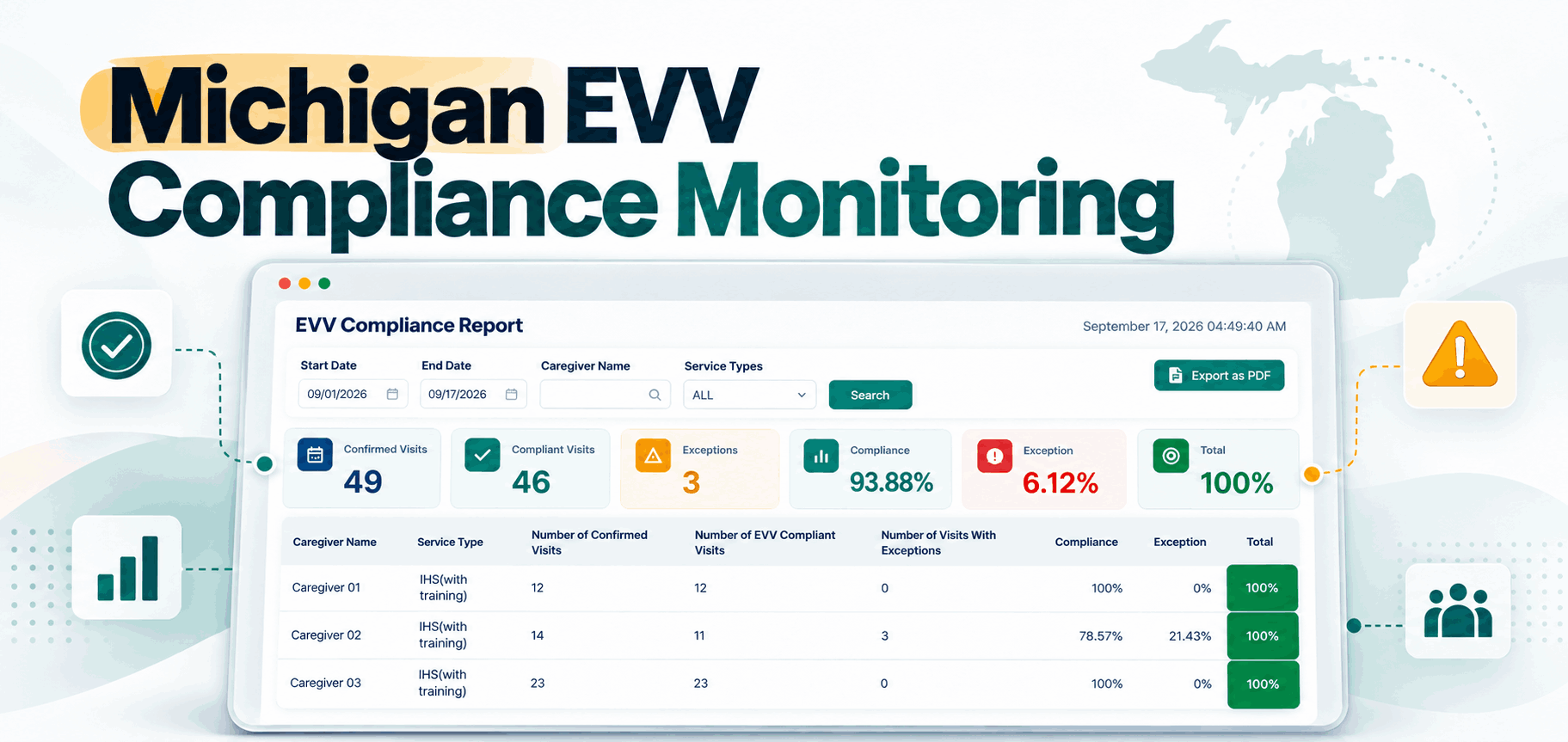
For Michigan Medicaid agencies subject to MMP 26-10, simply “having EVV” is no longer enough. MDHHS began enforcing its EVV compliance policy for applicable agencies and FI/FMS providers on April 1, 2026. The policy evaluates verified visits and manual edits, and measures compliance by payer.
For a new agency, that changes what you should look for. Beyond “Can caregivers clock in?”, ask whether you can quickly identify missed clock-ins and clock-outs, see which visits required manual corrections, spot patterns by caregiver, monitor EVV compliance before the quarter ends, catch transmission problems, confirm whether a visit reached the aggregator, and separate issues by payer. The best time to build good EVV habits is when you have five caregivers, not fifty.
6. Authorization and Service-Unit Tracking
A scheduled visit is not automatically a billable visit. If a payer has authorized a specific service, time period, or number of units, your scheduling and billing need to respect those limits, or the problem only surfaces after care has already been delivered.
Look for a system that helps your office answer whether the authorization is active, how many units were approved, how many have already been used, when the authorization or reassessment expires, and whether scheduled services will exceed what’s available. Authorization tracking shouldn’t begin in the billing department; ideally it shapes scheduling before the visit happens.
7. Visit Documentation
Your caregivers shouldn’t finish a visit while your office wonders whether the documentation needed for the next step is complete. Before you choose software, clarify what your agency needs at the point of care, which may include service documentation, tasks performed, care notes, electronic signatures, time records, exceptions, and any required forms.
Then ask the vendor a pointed question: “What prevents an incomplete visit from moving forward unnoticed?” A missing piece of visit documentation is easiest to fix while the visit is still fresh, and much harder once billing is already waiting on it.
8. Home Care Billing Software
Many new owners think about billing only after they start signing clients. Reverse that order and learn how a completed visit becomes money before you deliver the visit. For every payer you intend to serve, map the chain:
The process begins once the visit is completed. Documentation is reviewed, EVV is validated, and authorization is checked. The claim or invoice is then prepared and submitted, followed by status tracking and the posting of payment or remittance.
Your home care billing software should move through that chain without your team rebuilding the same information at each step. Depending on your payer mix, look for Medicaid billing, private-pay billing, claim preparation, pre-submission validation, billing status tracking, remittance tracking, authorization and unit visibility, and reporting.
The question for a vendor isn’t “Do you have billing?” It’s “Show me how yesterday’s completed visit becomes a claim or invoice, including everything my office has to review or correct along the way.” That answer tells you far more than a feature list.
9. Payroll and Timesheet Workflow
The same visit that drives billing usually drives payroll, which raises a question for any growing agency: Will your billing and payroll work from the same visit record? Picture a visit scheduled 9:00–12:00 where the caregiver clocks in at 9:07 and someone edits the entry. If payroll uses one time and billing uses another, your administrator ends up investigating a three-minute discrepancy across two systems.
Before your first payroll cycle, decide how caregiver time moves from the completed visit into payroll review. Your system should make it easy to see scheduled time, actual visit time, corrections, approved payable time, and visit history in one place.
Michigan Home Help agencies should also stay aware of employer obligations that live outside the software. MDHHS reminded Home Help providers in February 2026 that Michigan’s Earned Sick Time Act may apply to agency staff, and that agencies are responsible for determining eligibility and tracking applicable earned sick time. Software helps with records and workflow, but it does not replace your responsibility to understand employment requirements.
10. Caregiver Communication
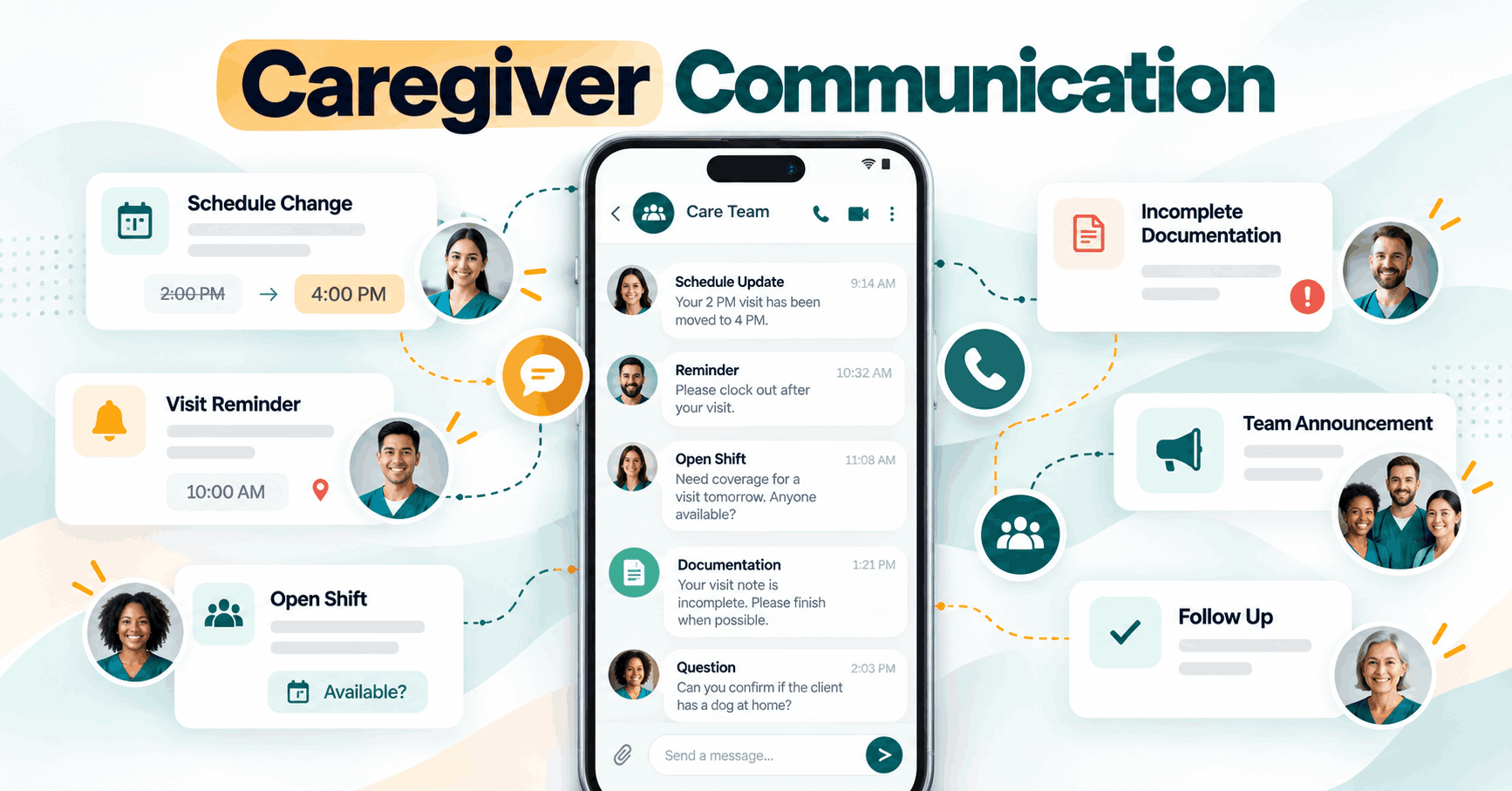
Running an agency involves a steady stream of “Did you see the schedule change?”, “Please remember to clock out,” “Can you cover this visit?”, “Your documentation is incomplete,” and “Please call the office.” If all of that happens through personal texts, phone calls, and separate chat apps, communication gets very hard to track as you grow.
Look for tools that let the office communicate about schedules and visits without turning one coordinator’s phone into the agency’s operating system. Caregiver communication features earn their keep the moment you’re juggling last-minute changes, visit reminders, open shifts, caregiver questions, announcements, and follow-ups.
11. Reporting: Catch Problems Before They Get Expensive
With one client, reporting feels unnecessary; you were there, so you already know what happened. That changes fast. By client 25, caregiver 40, or payer number three, memory stops being a management system.
A new agency should be able to answer, at a glance, which visits are incomplete, which caregivers repeatedly miss clock-outs, how many authorized units remain, which claims are unpaid, which visits required corrections, whether scheduled and completed hours match, which payers need attention, and what still needs review before payroll and before billing. Good reporting isn’t about prettier charts; it should tell your team what needs action today.
Michigan Medicaid Startup? Your Technology Checklist Is Different
If you plan to become a Michigan Home Help agency, don’t confuse buying software with being ready to provide Medicaid services. MDHHS lists a specific Home Help agency process that includes obtaining an EIN, registering the business, obtaining an NPI, registering in SIGMA, establishing MiLogin access, completing CHAMPS enrollment, submitting required agency documentation, preparing for EVV, and completing HHAeXchange onboarding. Agencies must receive the appropriate approval before billing Home Help services.
CHAMPS matters because Michigan requires Medicaid providers serving beneficiaries to be enrolled in the system, and Home Help agencies must complete the applicable enrollment before delivering Home Help services. There’s also an upcoming operational detail to plan for now: MDHHS has announced that HHAeXchange portal access will move through MiLogin in October 2026. If Medicaid is part of your launch plan, build your technology setup alongside your enrollment process, not after it.
Should a New Home Care Agency Start With Spreadsheets?
You can, but the more useful question is what you’ll have to rebuild later. A spreadsheet can track a small schedule. It gets much harder when a single row has to represent the client’s authorized service, the caregiver assignment, the planned visit, actual time worked, EVV data, documentation status, payroll, billing, and claim status all at once. Then you’re editing the schedule in one file, caregiver hours in another, and billing in a third.
The danger isn’t that spreadsheets suddenly stop working. It’s that they keep working just well enough for you to build more and more processes around them, until switching becomes genuinely painful. If you already know your agency will rely on recurring caregiver schedules, EVV, authorizations, Medicaid billing, or multiple payers, putting real home care management software in place earlier can save you significant rework.
Do You Need an All-in-One Home Care Platform?
Not necessarily, but you do need connected workflows. Plenty of agencies use specialized tools for payroll, accounting, or other functions. The trouble starts when every workflow requires someone to carry information from one system to another by hand.
Think about a single visit. It can move through scheduling, EVV, documentation, authorization usage, payroll, billing, and reporting. If your staff re-enters that visit five times, every handoff creates another chance for the numbers to disagree. So when you compare home care software, prioritize workflow continuity over the length of the feature list on a vendor’s website.
10 Questions to Ask Before Buying Home Care Software in Michigan
Take these into every product demo:
- Show me the complete workflow from new client intake to first completed visit.
- How does a schedule change reach the caregiver?
- What does the caregiver have to do during a normal visit?
- If a caregiver misses a clock-in or clock-out, how does my office find it?
- If I provide Michigan Medicaid services requiring EVV, how does visit data get to HHAeXchange?
- Can I tell whether an EVV visit was accepted, rejected, or still needs attention?
- How are authorization limits or remaining units tracked?
- Show me how a completed visit becomes billing-ready.
- Show me how the same visit flows into payroll review.
- What will I still have to enter manually in another system?
Question 10 may be the most important. Every platform will show you what it does; you need to discover what your staff will still have to do.
Common Software Mistakes New Michigan Home Care Agencies Make
- Choosing on price alone. Startup budgets matter, but compare the total workflow, not just the monthly subscription. Cheap software that leaves your staff reconciling schedules, EVV, payroll, and billing by hand every week has a cost; it just shows up somewhere else.
- Setting up EVV after caregivers form habits. If EVV applies to your services, train caregivers before their first required visit. Changing established behavior later is much harder.
- Thinking billing begins in the billing department. Billing problems usually start earlier, with scheduling, authorizations, visit capture, or documentation. Build the workflow backward from payment.
- Buying separate tools without mapping the handoffs. Specialized software is fine; just identify every point where information moves between systems and decide who owns that step.
- Ignoring the caregiver experience. Your office may use the platform for eight hours a day. Your caregiver may use it for sixty seconds at clock-in and sixty at clock-out. Those two minutes decide whether your data is clean.
- Waiting until you’re “bigger” to build a system. Growth amplifies whatever you build first. A clean five-client workflow is far easier to scale than a fifty-client workaround.
How Caretap Fits a New Michigan Home Care Agency?
Caretap is built around the connected workflow new home care agencies eventually need. The platform brings together EVV, scheduling, caregiver mobile and telephony access, intake and case documentation, billing, payroll, and caregiver communication.
For Michigan agencies, Caretap also offers Michigan-specific EVV that transmits applicable visit data to HHAeXchange. The Michigan offering currently includes mobile and telephony visit capture, GPS, point-of-care signatures, and HHAeXchange transmission, with scheduling, billing, payroll, and more advanced agency-management capabilities available in the broader platform.
That means a startup can build around a single visit workflow instead of stitching together separate processes for every department: schedule the visit, capture the visit, review it, and move it toward payroll and billing. That’s the system you want in place while your agency is still small enough to build it correctly.
Starting your Michigan home care agency? See how Caretap helps you set up EVV, scheduling, caregiver workflows, billing, and payroll before the operational work starts piling up.
Your First Client Should Test Your Care, Not Your Back Office
Starting a home care agency is exciting because the first client makes everything real. But that first visit shouldn’t also be the first test of your scheduling process, caregiver app, clock-in workflow, documentation, or billing. Before that first caregiver walks through that first client’s door, you should already know what happens next: the client is accepted, the caregiver assigned, the visit scheduled and delivered, the time captured, the documentation completed, the visit reviewed, and payroll and billing prepared and tracked.
Build that chain while your agency is small, because the system that handles your first client becomes the foundation for the one that may eventually handle your hundredth.