


Every month, your practice sends out hundreds, maybe thousands, of claims. And every month, 12 to 15 cents of every dollar quietly comes back as a denial.
That’s not a billing staff problem. It’s not a payer problem. It’s a software problem.
The average behavioral health practice operates with a 12-15% claim denial rate. The top-performing practices keep theirs under 5%. For a mid-sized ABA practice billing $1.5 million annually, that gap represents over $150,000 in revenue that never reaches your bank account.
And denials are only part of the picture. There’s the staff time spent chasing rejected claims. The slow reimbursements are stretching your cash flow. The authorization errors quietly accumulate until they trigger an audit.
Modern ABA billing software closes that gap, not by working harder, but by automating the upstream causes before they become expensive downstream problems.
This guide breaks down exactly what separates high-performing ABA billing platforms from the generic tools most practices are still running on, which CPT codes your software must handle correctly, and how to choose a platform that actually moves the needle on revenue.
What Is ABA Billing Software and Why Generic Tools Don’t Cut It?
ABA billing software is a specialized platform that automates the full revenue cycle for Applied Behavior Analysis providers, including insurance eligibility verification, CPT code application, authorization tracking, claim scrubbing, electronic submission, denial management, and payment posting.
Unlike general medical billing systems, ABA billing software is built around the specific requirements of behavioral health reimbursement: time-based 15-minute units, modifier complexity, supervision documentation rules, and payer-specific authorization caps.
Generic medical billing tools fall short for ABA practices for four core reasons:
Time-based unit calculations. ABA codes such as 97153 and 97155 are billed in 15-minute increments. Most general EHRs handle time tracking clumsily, and small rounding errors compound into significant underbilling across thousands of sessions.
Modifier complexity. Codes often require modifiers like HM (technician-delivered) or GT (telehealth). Missing or incorrect modifiers are consistently among the top reasons ABA claims are denied, and payer rules on these vary by insurance plan.
Authorization caps. ABA services almost always operate under pre-approved authorization limits. Software that doesn’t track these in real time creates compliance gaps that can trigger retroactive recoupment or full audits.
Credential-tied billing rules. RBTs, BCaBAs, and BCBAs bill different codes. Payers reject claims when the provider type doesn’t match the submitted code, a check that ABA-specific software automates, but generic tools leave entirely to human judgment.
The result: Practices using generic medical billing tools consistently see higher denial rates, slower payment cycles, and more compliance exposure than those running on ABA-specific platforms.
The Hidden Cost of Manual ABA Billing in 2026
Most ABA practices know they have billing inefficiencies. What they underestimate is the total dollar size, because the cost shows up in multiple places that are hard to see at once.
Here’s a realistic breakdown for a 30-client practice billing $1.2 million annually:
- A 12% denial rate generates roughly $144,000 in initial denials per year.
- Even with strong appeals, 35-40% of those denials are never recovered, that’s $50,000+ in permanently lost revenue.
- Staff time spent appealing denials, correcting claims, and chasing payments averages 8-12 hours per week, equivalent to a part-time billing salary.
- Average days’ sales outstanding (DSO) of 45-60 days creates real cash flow strain on a growing practice.
This isn’t a software problem in isolation. It’s a structural problem that compounds: missing modifiers cause denials, denials delay payments, delayed payments squeeze cash flow, cash flow stress limits hiring, and limited hiring caps how many clients you can serve.
Modern ABA billing software breaks this cycle by automating the upstream causes, clean documentation, accurate code application, real-time authorization checks, and pre-submission claim scrubbing so problems are prevented rather than chased.
The ABA CPT Codes Your Billing Software Must Handle Correctly
Any ABA billing software worth considering must natively support the full set of adaptive behavior CPT codes with credential validation and modifier logic built in. Here are the codes that every ABA practice routinely bills:
97151 – Behavior identification assessment
Used for initial assessments. Billable only by a BCBA or qualified healthcare professional (QHP). Documentation must support the assessment methodology and time involved.
97153 – Adaptive behavior treatment by protocol
The most-billed ABA code. Used when an RBT or behavior technician delivers therapy following a treatment plan, under BCBA supervision. Billed in 15-minute units. Some payers require the HM modifier.
97154 – Group adaptive behavior treatment
Used for sessions with multiple clients. Reimbursement rates and documentation requirements vary significantly by payer; your software needs to handle the variance automatically.
97155 – Adaptive behavior treatment with protocol modification
Used when a BCBA directly modifies a treatment protocol during a session. Requires explicit documentation of what was changed, why, and how the client responded. Given your frequent audits, your notes need to hold up.
97156 – Family adaptive behavior treatment guidance
Used for parent or caregiver training sessions. Must document specific learning objectives and strategies discussed, not just session updates or general check-ins.
Your billing software should automatically validate that:
- The provider credential matches the code being billed (RBTs cannot bill 97155; BCBAs typically don’t bill 97153 for protocol-following sessions)
- Time-based units round correctly to the 15-minute increment
- Required modifiers are applied based on payer-specific rules
- Authorization units are decremented in real time as sessions close
- Documentation requirements for each code are met before submission
Practices that automate this validation typically increase first-pass acceptance from 70-80% to 95%+ within the first quarter, without adding a single billing staff member.
9 Must-Have Features in ABA Billing Software (2026 Checklist)
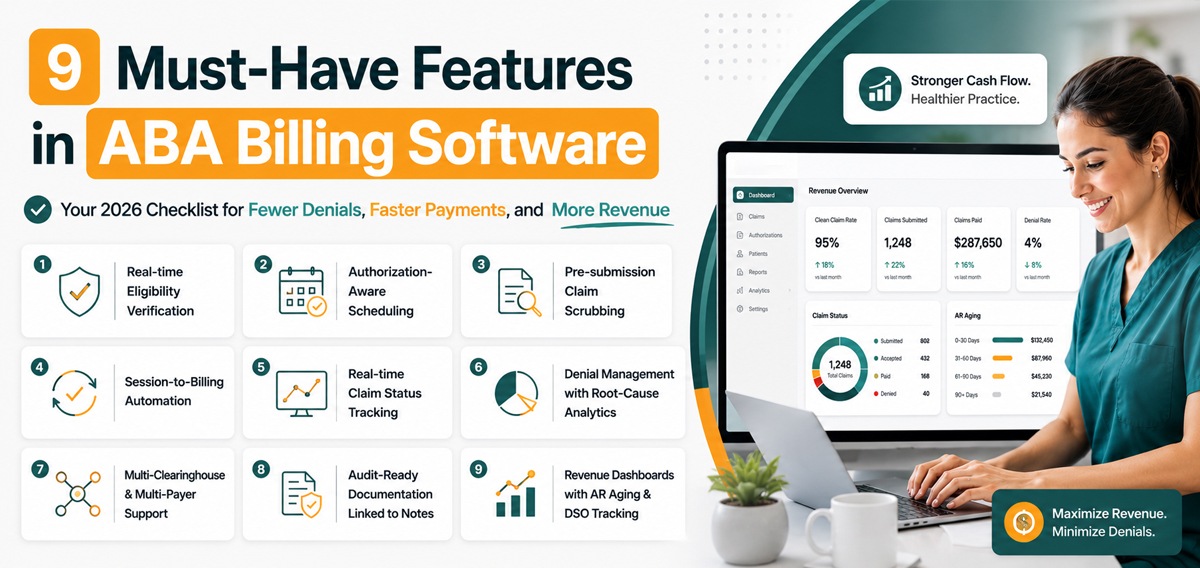
Not all ABA billing software delivers the same results. Use this checklist when evaluating any platform:
1. Real-time insurance eligibility verification
The software should ping payer systems to verify active coverage before sessions are delivered, not after claims are denied. Pre-session verification eliminates one of the most avoidable denial categories.
2. Authorization-aware scheduling
When a session is booked, the software should automatically check remaining authorized units and block scheduling that would exceed the approved limit. This prevents the most common ABA compliance risk before it ever becomes a billing problem.
3. Pre-submission claim scrubbing
Every claim should be validated against payer-specific rules, codes, modifiers, units, and credentials before it leaves your system. Clean claims don’t get denied.
4. Session-to-billing automation
Completed sessions should flow directly into the billing queue with correct CPT codes, units, and dates pre-populated. Eliminating the manual re-entry step reduces data-entry errors that cause most preventable denials.
5. Real-time claim status tracking
You should see exactly where every claim is in the cycle, submitted, accepted, paid, denied, without logging into separate clearinghouse portals. Visibility enables faster action when something goes wrong.
6. Denial management with root-cause analytics
When denials happen, the software should categorize them by reason and payer so you can identify recurring patterns and fix them upstream, rather than appealing the same error type month after month.
7. Multi-clearinghouse and multi-payer support
Modern ABA practices bill across multiple payers and often multiple clearinghouses. Your software should handle this without manual workarounds or separate logins for each payer relationship.
8. Audit-ready documentation linked to session notes
Every billed unit should trace back to a time-stamped, clinically complete session note that can defend the claim during a payer review or audit. If your billing and notes live in separate systems, you face audit risk.
9. Revenue dashboards with AR aging and DSO tracking
Practice leaders need real-time visibility into clean claim rates, denial trends, AR aging, and forecasted revenue, not month-end reports that arrive too late to act on. Dashboards turn billing data into business decisions.
If your current software is missing more than three of these, you’re almost certainly leaving revenue on the table that better technology would recover.
What ABA Billing Software Means for BCBAs, RBTs, and Billing Managers?
The most common mistake practices make when choosing ABA billing software is treating it as a decision for the billing department. In reality, the platform touches three distinct roles, and the right system serves all three.
For BCBAs
The focus is on supervision documentation, protocol modification tracking, and audit defence. When billing 97155, the software must capture the clinical reasoning behind each protocol change in a format that withstands payer scrutiny. It also needs to support the supervision ratios that 97153 billing requires, at least 10% BCBA oversight of RBT time.
For RBTs
The software is about real-time session capture, accurate unit tracking, and eliminating after-hours documentation catch-up. Modern ABA billing platforms allow RBTs to document sessions as they happen with timestamps, behavior data, and intervention notes flowing directly into the billing workflow.
For Billing Managers
The software is about clean claim rates, denial dashboards, and payer-specific automation. The right platform makes a billing manager dramatically more productive, enabling them to handle 2 to 3 times the claim volume without adding staff because upstream work is automated.
When evaluating ABA billing software, run the demo with all three roles present. If the software optimizes for one role at the expense of the others, it will create friction that erodes your ROI within months of going live.
How to Choose the Right ABA Billing Software: A 5-Step Buyer Framework?
Step 1: Audit your current numbers first
Before talking to any vendor, document your current denial rate, first-pass acceptance rate, DSO, and weekly hours spent on billing rework. You need a baseline; you can’t measure whether the software actually helped.
Step 2: Map your full tech stack
List every tool currently in your billing workflow: EHR, scheduling, session notes, clearinghouse, and payroll. Identify which are integrated and which require manual data transfer. Those manual handoffs are where errors compound.
Step 3: Identify your top three payer rules
Pull data on which payers represent the majority of your revenue. Document their unique billing requirements, modifier preferences, authorization rules, and documentation standards. Verify that any software you evaluate handles these natively, not as custom workarounds.
Step 4: Test for ABA-specific features, not general claims capability
Many platforms claim behavioral health support but lack the unit math, modifier logic, and authorization tracking that ABA billing actually requires. Use the 9-feature checklist above as your evaluation rubric, not the vendor’s feature list.
Step 5: Demo with your actual workflows
Don’t accept a scripted vendor demo. Bring real session scenarios, real authorization edge cases, and real denial patterns from the past 90 days. Watch how the software handles them in real time. The cracks show up fast.
The ROI of Switching ABA Billing Software
Let’s run the numbers for a typical 30-client ABA practice billing $1.2 million annually.
Before switching (manual or generic billing):
- Denial rate: 14%
- Annual denied claims: $168,000
- Permanently lost revenue (40% of denials never recovered): $67,000
- DSO: 45 days
- Manual billing rework: 8 hours/week ($22,000/year in labor)
- Total annual cost of inefficiency: $89,000
After switching to integrated ABA billing software:
- Denial rate: 4%
- Annual denied claims: $48,000
- Permanently lost revenue: $19,000
- DSO: 22 days
- Manual billing rework: less than 1 hour/week ($2,750/year)
- Total annual cost of inefficiency: $22,000
Estimated annual recovery: $67,000.
Even accounting for software costs, most practices reach a positive ROI within 90 days of switching, and the recovered revenue compounds year over year as denial rates stabilize at the new baseline.
How Caretap Brings It All Together?
Caretap ABA Billing Software was built specifically to solve the billing complexity that keeps ABA practices stuck in cycles of denials, delays, and manual rework.
Session-to-billing integration means every completed session flows directly into the claims queue with the correct CPT code, unit count, and date already populated. The manual entry step that creates most billing errors simply doesn’t exist.
Automatic authorization monitoring tracks every authorization in real time. When a client’s remaining units approach the limit, your team is alerted before sessions are scheduled, preventing one of the most common and costly compliance errors in ABA.
AI-powered session documentation generates clinically complete, audit-ready notes during sessions, not after them. Every billed unit can be traced back to documentation that supports the claim on review.
Real-time analytics give billing managers and practice owners a live view of clean claim rates, denial trends, AR aging, and revenue forecasting without waiting for month-end reports.
Authorization-aware scheduling matches therapist availability, client authorization status, and credentialing rules in one workflow, preventing the scheduling decisions that cause downstream billing problems.
Stop Losing Revenue to Manual ABA Billing
Every month your practice runs on outdated or generic billing tools is another month of denied claims, delayed reimbursements, and revenue that never reaches your accounts.
The math is straightforward: modern ABA billing software pays for itself within months, then continues compounding returns through cleaner claims, faster payments, and freed-up staff time.
Caretap brings every capability covered in this guide session-to-billing integration, authorization-aware scheduling, AI-powered documentation, real-time analytics, and ABA-specific automation, into one connected platform built for how ABA practices actually operate.
Schedule your free Caretap demo today and see exactly how much revenue your current system is leaving on the table.